RRAP-IS Modelling Workflow Demonstration Notebook
A tutorial of RRAP-IS system use from a modeller's perspective.


- About
- Authentication
- Endpoint Documentation
- Notebook helper functions
- Demonstration
%%capture
import requests
import os
import sys
import json
from json2html import *
from bs4 import BeautifulSoup
from IPython.display import IFrame, display, HTML, JSON, Markdown, Image
from mdsisclienttools.auth.TokenManager import DeviceFlowManager
import mdsisclienttools.datastore.ReadWriteHelper as IOHelper
from urllib.error import HTTPError
import networkx as nx
import nx_altair as nxa
from networkx.readwrite import json_graph

import numpy as np
import pandas as pd
import holoviews as hv
from holoviews import opts
hv.extension('bokeh')
defaults = dict(width=800, height=600)
hv.opts.defaults(opts.EdgePaths(**defaults), opts.Graph(**defaults), opts.Nodes(**defaults))

import warnings
warnings.filterwarnings(action='once')
data_store = "https://data.testing.rrap-is.com"
data_api = "https://data-api.testing.rrap-is.com"
registry_api = "https://registry-api.testing.rrap-is.com"
prov_api = "https://prov-api.testing.rrap-is.com"
auth_server = "https://auth.dev.rrap-is.com/auth/realms/rrap"
# garbage = "https://frogs.are.green"
base_urls = {'data_api': data_api, 'registry_api': registry_api, 'prov_api': prov_api, 'auth_server': auth_server, 'data_store': data_store}#, 'garbage': garbage}
display(f'Checking base urls')

for key, url in base_urls.items():
    try:
        print(f'Testing - {url}', end="")
        r = requests.get(url)
        r.raise_for_status()
        print(f' - Passed')
    except requests.exceptions.HTTPError as err:
        print(f' - Fail')
        raise SystemExit(err)
    except requests.exceptions.RequestException as e:
        # catastrophic error. bail.
        print(f' - Fail')
        raise SystemExit(e)
local_token_storage = ".tokens.json"

token_manager = DeviceFlowManager(
    stage="TEST",
    keycloak_endpoint=auth_server,
    local_storage_location=local_token_storage
)
Endpoint Documentation
Endpoint documentation can be found by appending either /docs or /redoc on the end a base URL.
For example:
Then select from the menu an endpoint function call e.g. /register/mint-dataset
Then append the function call onto the base url e.g. https://data-api.testing.rrap-is.com/register/mint-dataset
from enum import Enum
from enum_switch import Switch

def wrap_html_table(data):
    soup = BeautifulSoup(data)

    ul_tag = soup.find("table")
    div_tag = soup.new_tag("div")
    div_tag['style'] = "width: auto; height: 400px; overflow-y: auto; "
    ul_tag.wrap(div_tag)
    new_tag = soup.new_tag("details")
    div_tag.wrap(new_tag)

    tag = soup.new_tag("summary")
    tag.string = "Results"
    soup.div.insert_after(tag)

    return soup.prettify()

def json_to_md(response_json):
        json_obj_in_html = json2html.convert( response_json  )
        return wrap_html_table(json_obj_in_html)

def handle_request(method, url, params=None, payload=None, auth=None):
    try:
        if params:
            response = requests.request(method, url=url, params=params, auth=auth)
        elif payload:
            response = requests.request(method, url=url, json=payload, auth=auth)
        else:
            response = requests.request(method, url=url, auth=auth)
        # If the response was successful, no Exception will be raised
        response.raise_for_status()

    except HTTPError as http_err:
        print(f'HTTP error occurred: {http_err}')  # Python 3.6
        return {"error": http_err}
    except Exception as err:
        print(f'Other error occurred: {err}')  # Python 3.6
        return {"error": err }
    else:
        return response.json()

class ProvType(Enum):
    AGENT = 1
    ACTIVITY = 2
    ENTITY = 3

class ItemType(Enum):
    MODEL = 1
    PERSON = 2
    ORGANISATION = 3
    MODELRUN = 4
    MODEL_RUN_WORKFLOW = 5

class ProvTypeFromItemType(Switch):
    def MODEL(self):
        return ProvType.ENTITY

    def PERSON(self):
        return ProvType.AGENT

    def ORGANISATION(self):
        return ProvType.AGENT

    def MODELRUN(self):
        return ProvType.ACTIVITY

    def MODEL_RUN_WORKFLOW(self):
        return ProvType.ENTITY

prov_of_item = ProvTypeFromItemType(ItemType)
provs = [print(prov_of_item(t)) for t in ItemType]

def register_item(payload, item_type, auth):
    prov_type = prov_of_item(item_type)
    postfix = f'/registry/{prov_type.name.lower()}/{item_type.name.lower()}/create'
    endpoint = registry_api + postfix
    return handle_request("POST", endpoint, None, payload, auth=auth())

def registry_list(item_type, auth):
    prov_type = prov_of_item(item_type)
    postfix = f'/registry/{prov_type.name.lower()}/{item_type.name.lower()}/list'
    endpoint = registry_api + postfix
    return handle_request("GET", endpoint, None, None, auth=auth())

def registry_fetch(params, item_type, auth):
    prov_type = prov_of_item(item_type)
    postfix = f'/registry/{prov_type.name.lower()}/{item_type.name.lower()}/fetch'
    endpoint = registry_api + postfix
    return handle_request("GET", endpoint, params, None, auth=auth())
Demonstration
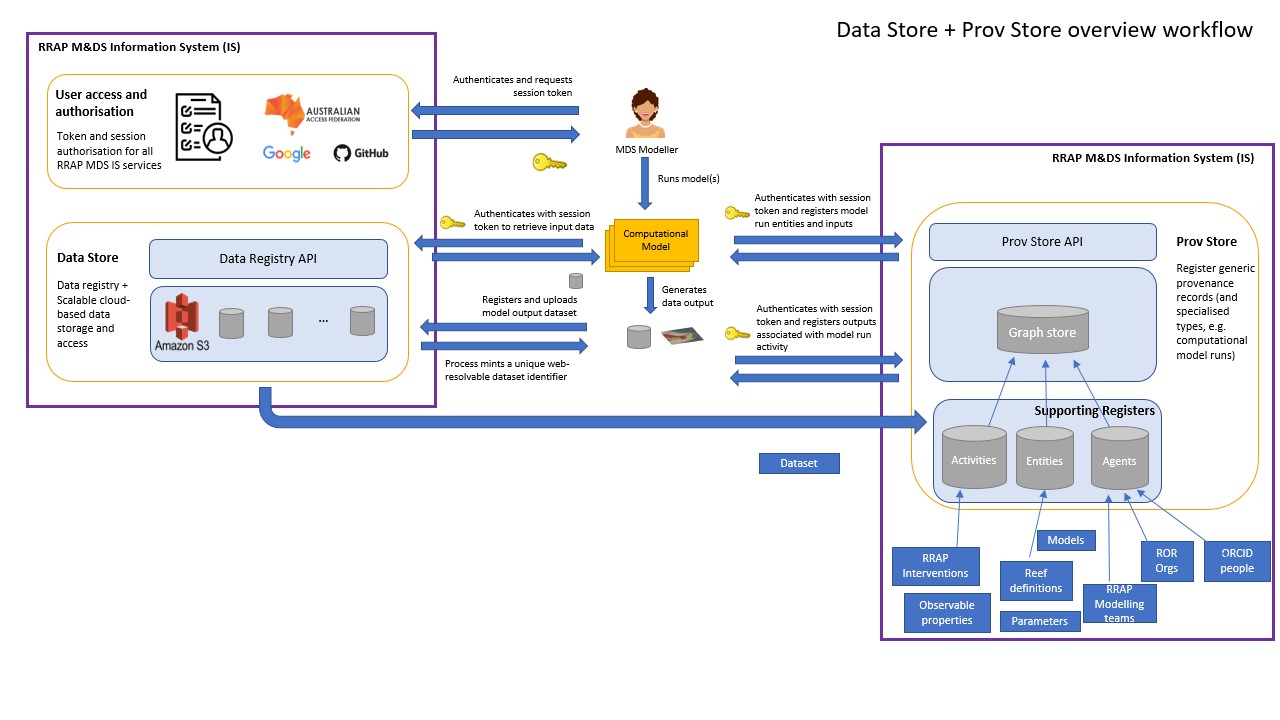
This demonstration illustrates how the RRAP-IS system can be integrated within a modelling scenario to use registered project data, upload and register model outputs and discover provenance information (what data was used for a particular model run and what are the associated outputs).
For the demonstration a fictitious model is used, the data is actual RRAP data and the provenance information is only derived from this exercise
Data
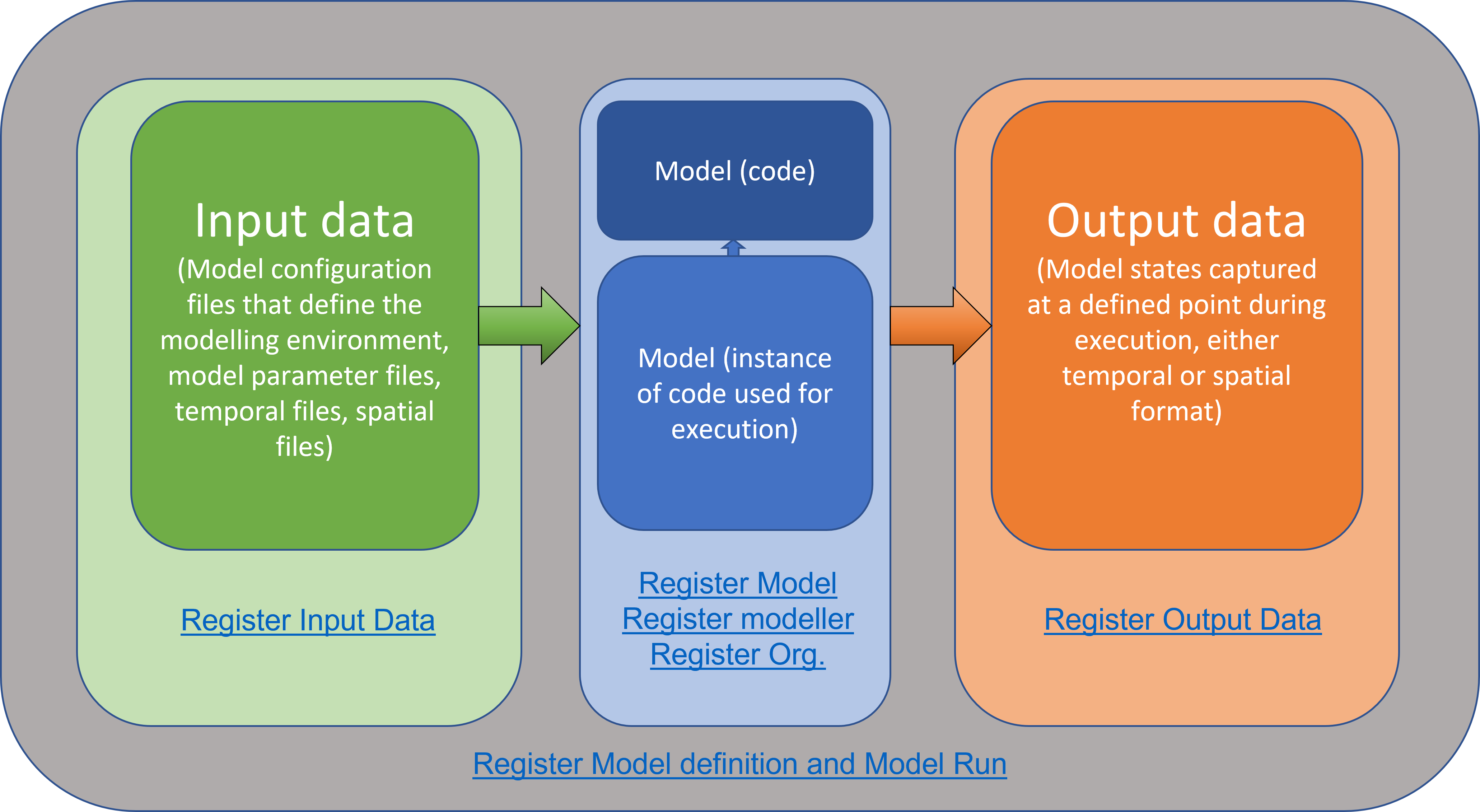
Similar to models we should use registered data else we should register new data and then use the registry to obtain the data. We will demonstrate listing existing dataset and registering a new dataset. Finally we will demonstrate using the registry to obtain data for a model run, register the run and the results/outputs from the run along with who (Modeller and Organisation) ran the model.
auth = token_manager.get_auth
dataset_id = '10378.1/1689073'
postfix = "/registry/items/fetch-dataset"
param = f'handle_id={dataset_id}'
endpoint = data_api + postfix
response_json = handle_request("GET", endpoint, param, None, auth())
HTML(json_to_md(response_json))
auth = token_manager.get_auth
postfix = "/register/mint-dataset"
payload =  {
  "author": {
    "name": "Andrew Freebairn",
    "email": "andrew.freebairn@csiro.au",
    "orcid": "https://orcid.org/0000-0001-9429-6559",
    "organisation": {
      "name": "CSIRO",
      "ror": "https://ror.org/03qn8fb07"
    }
  },
  "dataset_info": {
    "name": "MVP Demo Dataset",
    "description": "For demonstration purposes",
    "publisher": {
      "name": "Andrew",
      "ror": "https://ror.org/057xz1h85"
    },
    "created_date": "2022-08-05",
    "published_date": "2022-08-05",
    "license": "https://creativecommons.org/licenses/by/4.0/",
    "keywords": [
      "keyword1"
    ],
    "version": "0.0.1"
  }
}
endpoint = data_api + postfix

response_json = handle_request("POST", endpoint, None, payload, auth())
new_handle = response_json['handle']
HTML(json_to_md(response_json))
auth = token_manager.get_auth
IOHelper.upload(new_handle, auth(), "./data/demo_model_input.csv", data_api)
auth = token_manager.get_auth
IOHelper.download('./data/', new_handle, auth(), data_api)
Model
We should be able to discover a model within the registry or we can register a new model. First we will show how to list existing registered models and then we will demonstrate registering a new model. Then we will use the registery to obtain a model.
Note: The model used here is for demonstration purposes, the actual model will/can be more sophisticated.
auth = token_manager.get_auth
response_json = registry_list(ItemType.MODEL, auth)

HTML(json_to_md(response_json))
Register a new model
To register a model it first needs to be in a system where it is version and retrievable via that version code. We suggest using GitHub and will demonstrate the use here. Once in a version control system we can register it in the RRAP-IS.
- Commit the model to GitHub (This is done outside of the Jupyter env)
- Register the model with RRAP-IS Registry
model = [{
    "display_name": "RRAP-IS Demo",
    "name": "DEMO",
    "description": "Dummy model for demonstartion purposes",
    "documentation_url": "https://github.com/gbrrestoration/rrap-demo-model/blob/main/README.md",
    "source_url": "https://github.com/gbrrestoration/rrap-demo-model.git"
    }]
auth = token_manager.get_auth
response_json = [register_item(model, ItemType.MODEL, auth) for model in model]
HTML(json_to_md(response_json))
param = {
    "id": "10378.1/1691432",
    "seed_allowed": True
}
auth = token_manager.get_auth
response_json = registry_fetch(param, ItemType.MODEL, auth)
HTML(json_to_md(response_json))
from pathlib import Path
from git import Repo
model_repo = response_json['item']['source_url']
repo_dir = Path("rrapDemoModel")
repo_dir.mkdir(exist_ok=True)
if any(Path(repo_dir).iterdir()):
    print('pull ....')
    repo = Repo(str(repo_dir.resolve()))
    assert not repo.bare
    o = repo.remotes['origin']
    o.pull()
else:
    print('cloning ....')
    repo = Repo.clone_from(model_repo, repo_dir, branch='main')
print(repo)
import sys
sys.path.insert(0, str(repo_dir.resolve()))
demo = __import__("demomodel")

d_demo = demo.demo_model()
d_demo.runtimestep()
auth = token_manager.get_auth
postfix = "/register/mint-dataset"
payload =  {
  "author": {
    "name": "Andrew Freebairn",
    "email": "andrew.freebairn@csiro.au",
    "orcid": "https://orcid.org/0000-0001-9429-6559",
    "organisation": {
      "name": "CSIRO",
      "ror": "https://ror.org/03qn8fb07"
    }
  },
  "dataset_info": {
    "name": "MVP Demo Outputs",
    "description": "For demonstration purposes",
    "publisher": {
      "name": "Andrew",
      "ror": "https://ror.org/057xz1h85"
    },
    "created_date": "2022-08-05",
    "published_date": "2022-08-05",
    "license": "https://creativecommons.org/licenses/by/4.0/",
    "keywords": [
      "keyword1"
    ],
    "version": "0.0.1"
  }
}
endpoint = data_api + postfix

response_json = handle_request("POST", endpoint, None, payload, auth())
new_handle = response_json['handle']
HTML(json_to_md(response_json))
auth = token_manager.get_auth
IOHelper.upload(new_handle, auth(), "readme.txt", data_api)
Data
Input
- Dataset id:
10378.1/1691395 - Dataset template
id: 10378.1/1690478
Output
- Dataset id:
10378.1/1691397 - Dataset template id:
10378.1/1690478
Modeller
- id:
10378.1/1691138
Assc Organisation
- id:
10378.1/1691139
Workflow definition register
As this is the first time this model has been defined it should be registered
workflows = [{
  "display_name": "Demonstration Workflow Definition",
  "version": "0.0.1",
  "software": "10378.1/1691396",
  "automation_schedule": {},
  "input_templates": [
    "10378.1/1690478"
  ],
  "output_templates": [
    "10378.1/1690478"
  ]
}]

auth = token_manager.get_auth
responses_json = [register_item(wf, ItemType.MODEL_RUN_WORKFLOW, auth) for wf in workflows]
HTML(json_to_md(responses_json))
auth = token_manager.get_auth
postfix = "/model_run/register_complete"
payload = {
  "start_time": 0,
  "end_time": 1662467929,
  "workflow_definition": {
    "id": "10378.1/1691427"
  },
  "inputs": {
    "datasets": {
      "10378.1/1690478": {
        "template": {
          "id": "10378.1/1690478"
        },
        "dataset_type": "DATA_STORE",
        "dataset": {
          "id": "10378.1/1691395"
        }
      }
    }
  },
  "outputs": {
    "datasets": {
      "10378.1/1690478": {
        "template": {
          "id": "10378.1/1690478"
        },
        "dataset_type": "DATA_STORE",
        "dataset": {
          "id": "10378.1/1691397"
        }
      }
    }
  },
  "associations": {
    "modeller": {
      "id": "10378.1/1691138"
    },
    "requesting_organisation": {
      "id": "10378.1/1691139"
    }
  }
}
endpoint = prov_api + postfix

response_json = handle_request('POST', endpoint, None, payload, auth())
HTML(json_to_md(response_json))
Provenance
As all data, modellers, organisations and activities (specific to producing data used in decisions) are registered in RRAP-IS it is possible to traverse the linage between these entities. This can be useful in discovering what data (or modeller/model/s) was used to produce certain outputs.
Let's explore all entities associated with a modeller
auth = token_manager.get_auth
postfix = "/explore/downstream"
params = {
    "starting_id": "10378.1/1691138",
    "depth": 1
}
endpoint = prov_api + postfix

response_json = handle_request('GET', endpoint, params, None, auth())
result_graph = response_json["graph"]

networkx_graph = json_graph.node_link_graph(result_graph)
im = hv.Graph.from_networkx(networkx_graph, nx.layout.fruchterman_reingold_layout).opts(tools=['hover','tap'],
                                                                          node_size=10,
                                                                          node_color='item_category',
                                                                          cmap = ['blue','orange', 'green', 'red'],
                                                                          directed=True,
                                                                          arrowhead_length=0.02,
                                                                          bgcolor='pink')
labels = hv.Labels(im.nodes, ['x', 'y'], 'item_category').opts(opts.Labels(text_font_size='12pt', text_color='blue', xoffset=0, yoffset=0.05, bgcolor='white'))
labels_2 = hv.Labels(im.nodes, ['x', 'y'], 'item_subtype').opts(opts.Labels(text_font_size='8pt', xoffset=0, yoffset=-0.05, bgcolor='white'))
hv_graph = (im * labels * labels_2)

hv.save(hv_graph, 'network.html', backend='bokeh')

HTML("network.html")